SoftColor PhotoEQ の代替手段
24SoftColor PhotoEQ の代わりとなる 24 個の無料および有料のリストをまとめました。 主な競合相手はAdobe Photoshop、 Pixelmatorです。 これらに加えて、ユーザーは SoftColor PhotoEQ と MyPaint、 Pixlr、 PaintTool SAI の間の比較も行います。 また、他の同様のオプションもここで確認できます: 写真およびグラフィックソフトウェア。


 ソフトウェア

SoftColor PhotoEQ の代わりとなる 24 個の無料および有料のリストをまとめました。 主な競合相手はAdobe Photoshop、 Pixelmatorです。 これらに加えて、ユーザーは SoftColor PhotoEQ と MyPaint、 Pixlr、 PaintTool SAI の間の比較も行います。 また、他の同様のオプションもここで確認できます: 写真およびグラフィックソフトウェア。
SoftColor PhotoEQ の代わりとなる 24 個の無料および有料のリストをまとめました。 主な競合相手はAdobe Photoshop、 Pixelmatorです。 これらに加えて、ユーザーは SoftColor PhotoEQ と MyPaint、 Pixlr、 PaintTool SAI の間の比較も行います。 また、他の同様のオプションもここで確認できます: 写真およびグラフィックソフトウェア。
SoftColor PhotoEQ makes color correction, image editing and color management tasks simpler.
SoftColor PhotoEQ makes color correction, image editing and color management tasks simpler.
 Windows
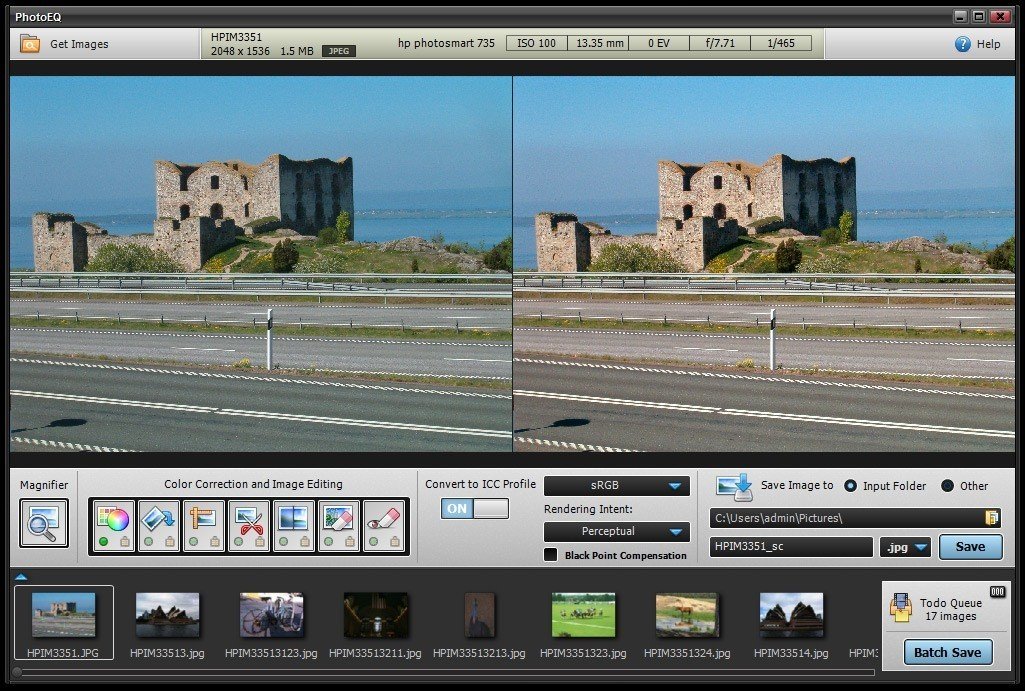
SoftColor PhotoEQ makes color correction, image editing and color management tasks simpler. Just drag and drop image files or folders to PhotoEQ and you are ready to start improving your images. PhotoEQ's todo queue helps you to organize and complete image editing tasks without any hassle. You can process files one by one or just batch process all with single click.
PhotoEQは、色補正と色管理の作業を簡素化します。PhotoEQの色補正は、ホワイトバランス、露出、コントラストの問題をシングルステップで自動的に修正します。PhotoEQは、標準のICCプロファイルベースのカラーマネジメントを完全にサポートし、埋め込みプロファイルをサポートします。PhotoEQは、異なる色空間間で変換およびレンダリングできます。たとえば、RGBからCMYKへの変換。
PhotoEQを使用すると、複数のデジタル画像とカメラのRAW形式を使用できます。処理した画像をJPEG、TIFF、PNG、BMP、およびPSDファイルに保存できます。
 Color management
Color correction
Color management
Color correction
ソフトウェアについての意見を共有し、レビューを残してさらに向上させるのに役立てましょう!
変更の提案


あなたのフィードバック
Your vote has been counted.
Do you have experience using this software?