Select your language

Home arrow-right ... arrow-right Office and Productivity Software arrow-right Stickies

We've compiled a list of 28 free and paid alternatives to Stickies. The primary competitors include LibreOffice, Box. In addition to these, users also draw comparisons between Stickies and Coda, Notion, OmniFocus. Also you can look at other similar options here: Office and Productivity Software.



Coda was a macOS-based web development application by Panic, combining a text editor, FTP client, terminal, and preview pane in a single interface. It supported multiple programming languages, real-time collaboration, and plugin extensibility.

(2)
5.0 out of 5
Notion
Subscription Free Free Trial

Your all-in-one workspace for wiki, documents, and projects. Streamline your work apps into a unified platform, enhancing collaboration and productivity. Discover the future of work with AI integration.

Microsoft PowerPoint
Free Subscription Free Trial

Microsoft PowerPoint is an AI-powered tool designed to help users create outlines, design slides, and organize content for professional presentations. It provides real-time feedback with Presenter Coach, summarizes key points, incorporates your orga…

Scribe
Subscription Free

The AI-powered tool transforming processes into step-by-step guides with text, links, and annotated screenshots. You can then edit instructions or modify screenshots.

Any.do
Subscription Free
ProWritingAid
Subscription Free Free Trial

ProWritingAid is a writing enhancement tool offering grammar, spelling, and style checks with detailed critique reports. It integrates with popular writing apps, ensures text security, and provides actionable advice to improve clarity, coherence, an…

TextExpander
Subscription Free Trial

TextExpander is the communication tool to boost team productivity by cutting the repetitive typing...

Stickies Platforms

Mac Mac
Web-Based Web-Based
Windows Windows

Stickies Video and Screenshots

Stickies Overview

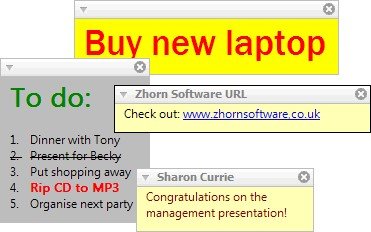
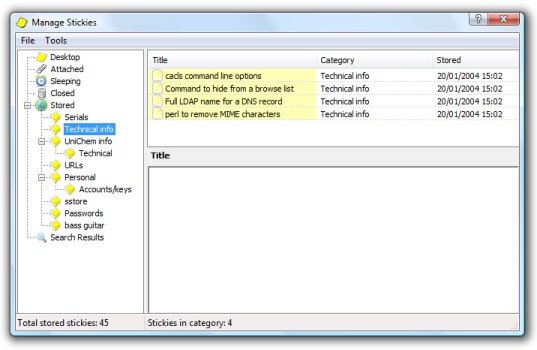
Stickies is a PC utility written to replace Post-It-style notes left stuck to your monitor. The design goal behind Stickies is that the program is small and simple. Stickies will not mess with your system files, or write to the Registry. Stickies stores all information in a single text-based INI file. Stickies will never support animated dancing figures, or play "Greensleeves". They are instead yellow rectangular windows onto which you can put some text notes. Once created, they will stay on screen until you take them away. Just like a real sticky piece of paper.

Version 6.7a includes an API to allow integration with other programs, and other bug-fixes and enhancements.

Stickies Features

tick-square Workflow Management
tick-square To-Do List
tick-square Third Party Integrations
tick-square Real Time Editing
tick-square File Transfer
tick-square File Sharing
tick-square File Management
tick-square Drag & Drop
tick-square Data Import/Export
tick-square Brainstorming
tick-square @mentions
tick-square Discussions/Forums
tick-square Notes Management
tick-square Content Management
tick-square Single Sign On
tick-square Secure Data Storage
tick-square Tagging
tick-square Real Time Notifications
tick-square Prioritization
tick-square Commenting/Notes
tick-square Chat/Messaging
tick-square Assignment Management
tick-square Task Progress Tracking
tick-square Reminders
tick-square Collaboration Tools
tick-square Status Tracking
tick-square Search/Filter
tick-square Progress Tracking
tick-square Document Management
tick-square Project Management
tick-square Document Storage
tick-square Alerts/Notifications
tick-square Access Controls/Permissions
tick-square Task Scheduling
tick-square Task Management

Top Stickies Alternatives

Share your opinion about the software, leave a review and help make it even better!

Stickies Tags

sticky-notes password-protection note-taking image-editing

Suggest Changes

() out of 5

Your Feedback

Select a rating
Please select a rating

Your vote has been counted.

Do you have experience using this software?