Proxy SwitchyOmega 대안
55개의 무료 및 유료 대안을 Proxy SwitchyOmega에 대한 목록으로 정리했습니다. 주요 경쟁 업체는 FoxyProxy, Proxy Switcher입니다. 이 외에도 사용자들은 Proxy SwitchyOmega와 Proxy changer, SmartProxy, Proxy-Switcher 간에 비교를 하기도 합니다. 또한 여기서 다른 유사한 옵션을 살펴볼 수 있습니다: 웹 브라우저.


 소프트웨어
소프트웨어


5개의 무료 및 유료 대안을 Proxy SwitchyOmega에 대한 목록으로 정리했습니다. 주요 경쟁 업체는 FoxyProxy, Proxy Switcher입니다. 이 외에도 사용자들은 Proxy SwitchyOmega와 Proxy changer, SmartProxy, Proxy-Switcher 간에 비교를 하기도 합니다. 또한 여기서 다른 유사한 옵션을 살펴볼 수 있습니다: 웹 브라우저.
5개의 무료 및 유료 대안을 Proxy SwitchyOmega에 대한 목록으로 정리했습니다. 주요 경쟁 업체는 FoxyProxy, Proxy Switcher입니다. 이 외에도 사용자들은 Proxy SwitchyOmega와 Proxy changer, SmartProxy, Proxy-Switcher 간에 비교를 하기도 합니다. 또한 여기서 다른 유사한 옵션을 살펴볼 수 있습니다: 웹 브라우저.

FoxyProxy는 Firefox, Google Chrome 및 Internet Explorer를위한 프록시 관리 도구 세트입니다.
 Linux
Linux
 Mac
Mac
 Windows
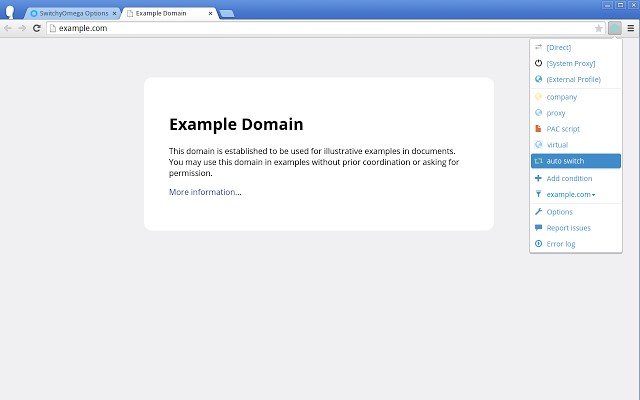
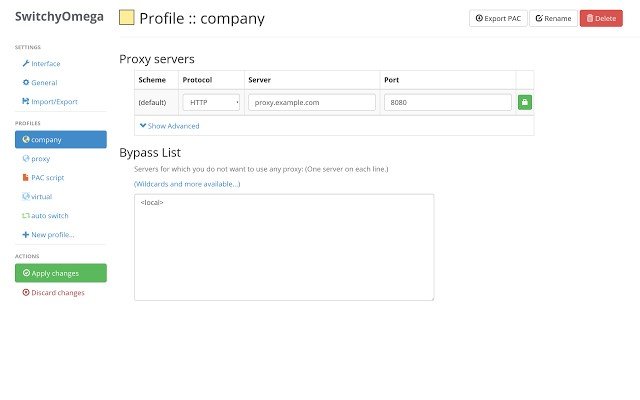
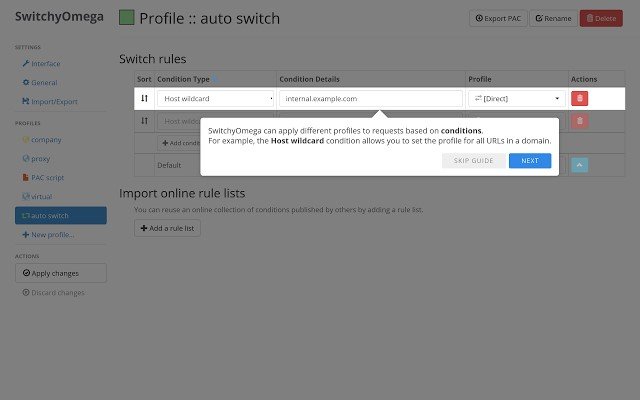
Manage and switch between multiple proxies quickly & easily.
NOTE: Please report issues using the "Report Issue" link in the icon dropdown menu so that I can locate and fix the issue more quickly.
Alternative download link (Github): https://github.com/FelisCatus/SwitchyOmega/releases
The 2.x version features:
* Proxy authentication (username & password) is now supported.
* More flexible proxy configurations: Fixed servers, multiple SwitchProfile and rule lists.
* Reviewing and modifying proxy settings for resources that fail to load.
* New types of condition for switching and improvements to the existing condition types.
* Optimized performance for both PAC script generating and switching.
* Improved user experience in options page and dropdown menu.
* Many Bug fixes and improvements. More testing.
== Translations ==
You can help improve the translation of SwitchyOmega or translate it into your language on Weblate:
https://hosted.weblate.org/engage/switchyomega/?utm_source=widget
== Upgrading from SwitchySharp ==
SwitchyOmega will try to use the existing SwitchySharp options (if installed) on installation. All options will be updated, and you can enjoy the new features without having to redo your configuration. If things don't work automatically for you, you can export a backup file manually in SwitchySharp and then import the file in SwitchyOmega.
CONFLICTS: SwitchyOmega will conflict with other extensions trying to control the proxy settings. Such conflicts are caused by the design of the Chrome browser and thus cannot be avoided. When SwitchyOmega has a higher priority, it can be configured to voluntarily give back the control by selecting the [System Proxy] item in the popup menu. Otherwise, you will see a red badge on the SwitchyOmega icon indicating insufficient priority. Re-installing SwitchyOmega should raise its priority, providing a possible workaround.
 Google Chrome Extensions
소프트웨어에 대한 의견을 공유하고 리뷰를 남겨 더 나아지도록 도와주세요!
변경 제안


귀하의 의견
Your vote has been counted.
Do you have experience using this software?