Google Cloud Print 대안
33개의 무료 및 유료 대안을 Google Cloud Print에 대한 목록으로 정리했습니다. 주요 경쟁 업체는 PrintNode, ezeep입니다. 이 외에도 사용자들은 Google Cloud Print와 Printix 간에 비교를 하기도 합니다. 또한 여기서 다른 유사한 옵션을 살펴볼 수 있습니다: 시스템 및 하드웨어 도구.


 소프트웨어
소프트웨어


3개의 무료 및 유료 대안을 Google Cloud Print에 대한 목록으로 정리했습니다. 주요 경쟁 업체는 PrintNode, ezeep입니다. 이 외에도 사용자들은 Google Cloud Print와 Printix 간에 비교를 하기도 합니다. 또한 여기서 다른 유사한 옵션을 살펴볼 수 있습니다: 시스템 및 하드웨어 도구.
3개의 무료 및 유료 대안을 Google Cloud Print에 대한 목록으로 정리했습니다. 주요 경쟁 업체는 PrintNode, ezeep입니다. 이 외에도 사용자들은 Google Cloud Print와 Printix 간에 비교를 하기도 합니다. 또한 여기서 다른 유사한 옵션을 살펴볼 수 있습니다: 시스템 및 하드웨어 도구.
<font style="vertical-align: inherit;"><font style="vertical-align: inherit;"> Google 클라우드 프린트를 사용하면 다음과 같이 인쇄 할 수있어보다 직관적이고 액세스 가능하며 유용한 인쇄가 가능합니다. </font></font>
<font style="vertical-align: inherit;"><font style="vertical-align: inherit;"> Google 클라우드 프린트를 사용하면 다음과 같이 인쇄 할 수있어보다 직관적이고 액세스 가능하며 유용한 인쇄가 가능합니다. </font></font>
 Android
 Web-Based
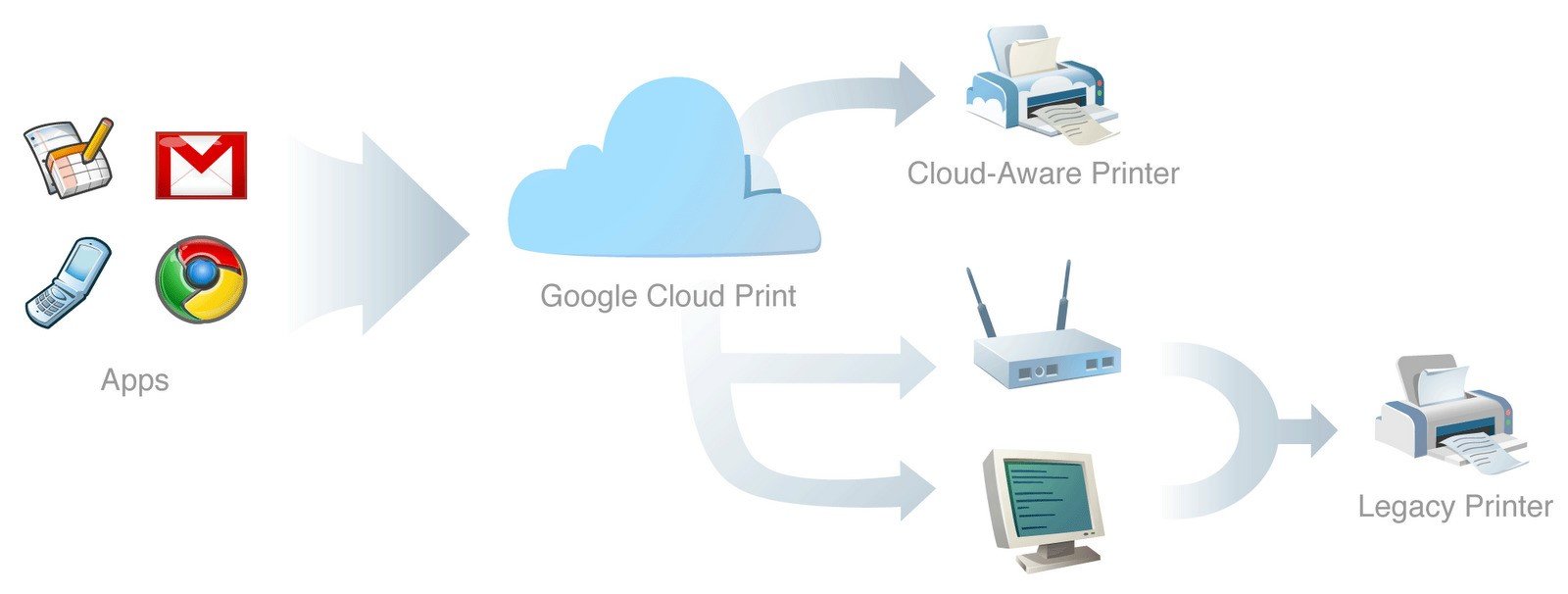
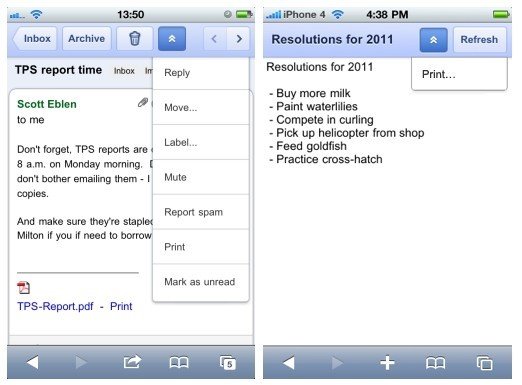
Google 클라우드 프린트를 사용하면 모든 컴퓨터 또는 스마트 폰에서 Google 클라우드 프린트를 지원하는 앱에서 프린터로 인쇄 할 수있어보다 직관적이고 액세스 가능하며 유용합니다.
Google Cloud Print is available:
On any web page, if you see a “Print” button with the Google Cloud Print logo, you can print without leaving your browser.
On any mobile device: if you access Gmail or Google Docs through your phone's browser ( go to m.google.com ), you can print any email, document, spreadsheet, or other Docs file through Google Cloud Print. Using the new print2docs feature, you can also "print" any file you wish to your Docs account for safe keeping.
From Google Chrome: you can print any of the open tabs on Chrome to Google Cloud Print by hitting Ctrl + P or "Print" from the wrench menu and selecting "Print with Google Cloud Print" from the destination dropdown. On the Chromebook, Cloud Print is the default print option.
Moreover you can see what application allow you to print to Google Cloud Print at http://www.google.com/cloudprint/learn/apps.html
소프트웨어에 대한 의견을 공유하고 리뷰를 남겨 더 나아지도록 도와주세요!
변경 제안


귀하의 의견
Your vote has been counted.
Do you have experience using this software?