AnyToISO 대안
33개의 무료 및 유료 대안을 AnyToISO에 대한 목록으로 정리했습니다. 주요 경쟁 업체는 CDBurnerXP, UltraISO입니다. 이 외에도 사용자들은 AnyToISO와 WinISO 간에 비교를 하기도 합니다. 또한 여기서 다른 유사한 옵션을 살펴볼 수 있습니다: CD/DVD 도구.


 소프트웨어
소프트웨어

3개의 무료 및 유료 대안을 AnyToISO에 대한 목록으로 정리했습니다. 주요 경쟁 업체는 CDBurnerXP, UltraISO입니다. 이 외에도 사용자들은 AnyToISO와 WinISO 간에 비교를 하기도 합니다. 또한 여기서 다른 유사한 옵션을 살펴볼 수 있습니다: CD/DVD 도구.
3개의 무료 및 유료 대안을 AnyToISO에 대한 목록으로 정리했습니다. 주요 경쟁 업체는 CDBurnerXP, UltraISO입니다. 이 외에도 사용자들은 AnyToISO와 WinISO 간에 비교를 하기도 합니다. 또한 여기서 다른 유사한 옵션을 살펴볼 수 있습니다: CD/DVD 도구.

UltraISO는 CD/DVD 이미지 파일을 생성, 편집, 변환할 수 있는 강력한 도구입니다. ISO, BIN, ISZ, DMG, DAA, UIF 형식을 지원하여 파일 추출, 부팅 가능한 디스크 만들기, 이미지를 ISO로 변환할 수 있습니다. 사용자 친화적인 인터페이스를 갖춘 UltraISO는 CD/DVD 이미지 관리를 간소화하고 다양한 이미지 형식과의 호환성을 보장합니다.
 Mac
Mac
 Windows
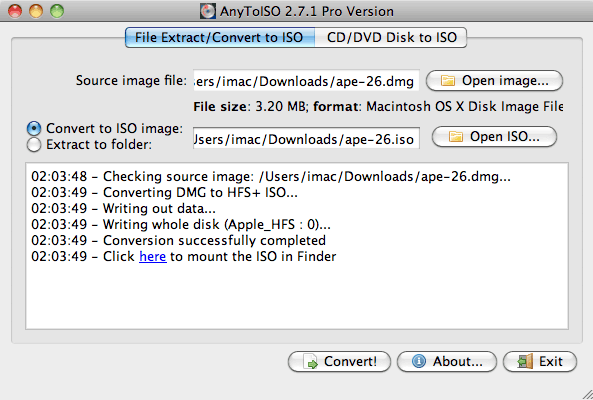
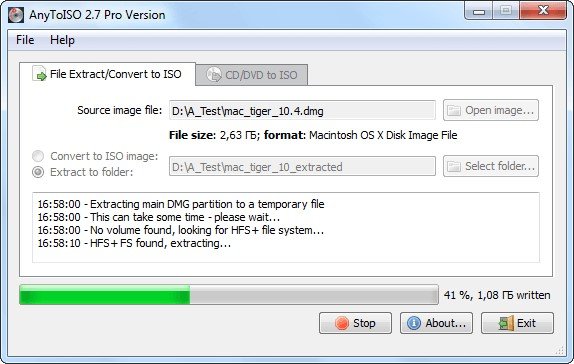
[Lite version is totally free but it cannot deal with files greater than a regular CD size (870 MB) ].
As the name suggests, AnyToISO Converter promises to convert just about any format to something that can be turned into a disk image (ISO).
More specifically, this means BIN, MDF, PDI, CDI, NRG, B5I, IMG, DEB and CD/DVD-ROM images to ISO. Note that it can also automatically extract DMG files to create images. If youve never created an image before then AnyToISO Converter couldnt be any easier for you. All you have to do is browse to the file that you want to create an ISO from and select a location to save it as an ISO. Click convert when youre done and thats it.
A progress dialog keeps you informed of how the conversion process is going. Conversions are very fast and there are no configuration options to mess about with. Unfortunately, it doesnt support batch conversions, so if you have a lot of conversions to do, you have to load them manually.
If youve struggled to convert a format to ISO then you might find AnyToISO Converter offers a simple but effective solution.
 Disk Imaging
소프트웨어에 대한 의견을 공유하고 리뷰를 남겨 더 나아지도록 도와주세요!
변경 제안


귀하의 의견
Your vote has been counted.
Do you have experience using this software?