Everything 대안
2020개의 무료 및 유료 대안을 Everything에 대한 목록으로 정리했습니다. 주요 경쟁 업체는 Listary, Agent Ransack입니다. 이 외에도 사용자들은 Everything와 RecentX, Recoll, UltraSearch 간에 비교를 하기도 합니다. 또한 여기서 다른 유사한 옵션을 살펴볼 수 있습니다: 파일 관리 도구.


 소프트웨어
소프트웨어


20개의 무료 및 유료 대안을 Everything에 대한 목록으로 정리했습니다. 주요 경쟁 업체는 Listary, Agent Ransack입니다. 이 외에도 사용자들은 Everything와 RecentX, Recoll, UltraSearch 간에 비교를 하기도 합니다. 또한 여기서 다른 유사한 옵션을 살펴볼 수 있습니다: 파일 관리 도구.
20개의 무료 및 유료 대안을 Everything에 대한 목록으로 정리했습니다. 주요 경쟁 업체는 Listary, Agent Ransack입니다. 이 외에도 사용자들은 Everything와 RecentX, Recoll, UltraSearch 간에 비교를 하기도 합니다. 또한 여기서 다른 유사한 옵션을 살펴볼 수 있습니다: 파일 관리 도구.
 Windows
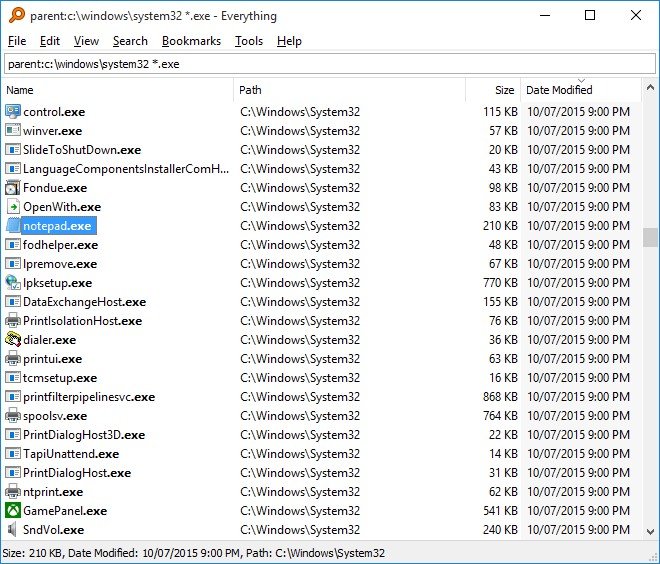
"Everything" is an administrative tool that locates files and folders by filename instantly for Windows. Unlike Windows search "Everything" initially displays every file and folder on local or removable NTFS volumes on your computer (hence the name "Everything"), and on mapped network drives with ETP server and an everything installation too. You type in a search filter to limit what files and folders are displayed. 19 languages supported.
How can "Everything" index a mapped network drive?
To search a networked computer you will need to run Everything on both computers.
One computer will need to Start an ETP server.
The other computer will need to connect to that ETP server.
ETP 서버를 시작하려면 다음을 수행
하십시오 . 1. 도구 메뉴에서 ETP 서버 시작을 클릭하십시오.
ETP 서버에 연결하려면 :
1. 모든 항목에서 도구 메뉴에서 ETP 서버에 연결 ...을 클릭하십시오.
2. ETP 서버 이름을 입력하십시오.
3. ETP 서버 포트를 입력하십시오.
4. ETP 서버 사용자를 입력하십시오.
5. ETP 서버 비밀번호를 입력하십시오.
6. 확인을 클릭하십시오.
 Instant results
Data export/import
Support for regular expressions
File Searching
Music Discovery
Portable
Instant results
Data export/import
Support for regular expressions
File Searching
Music Discovery
Portable
소프트웨어에 대한 의견을 공유하고 리뷰를 남겨 더 나아지도록 도와주세요!
변경 제안


귀하의 의견
Your vote has been counted.
Do you have experience using this software?